
RMM tools vs DCIM
RMM controls systems from inside the operating system. DCIM watches the physical data center. Modern infrastructure needs the missing layer between them: out-of-band hardware visibility connected to operations and business services.
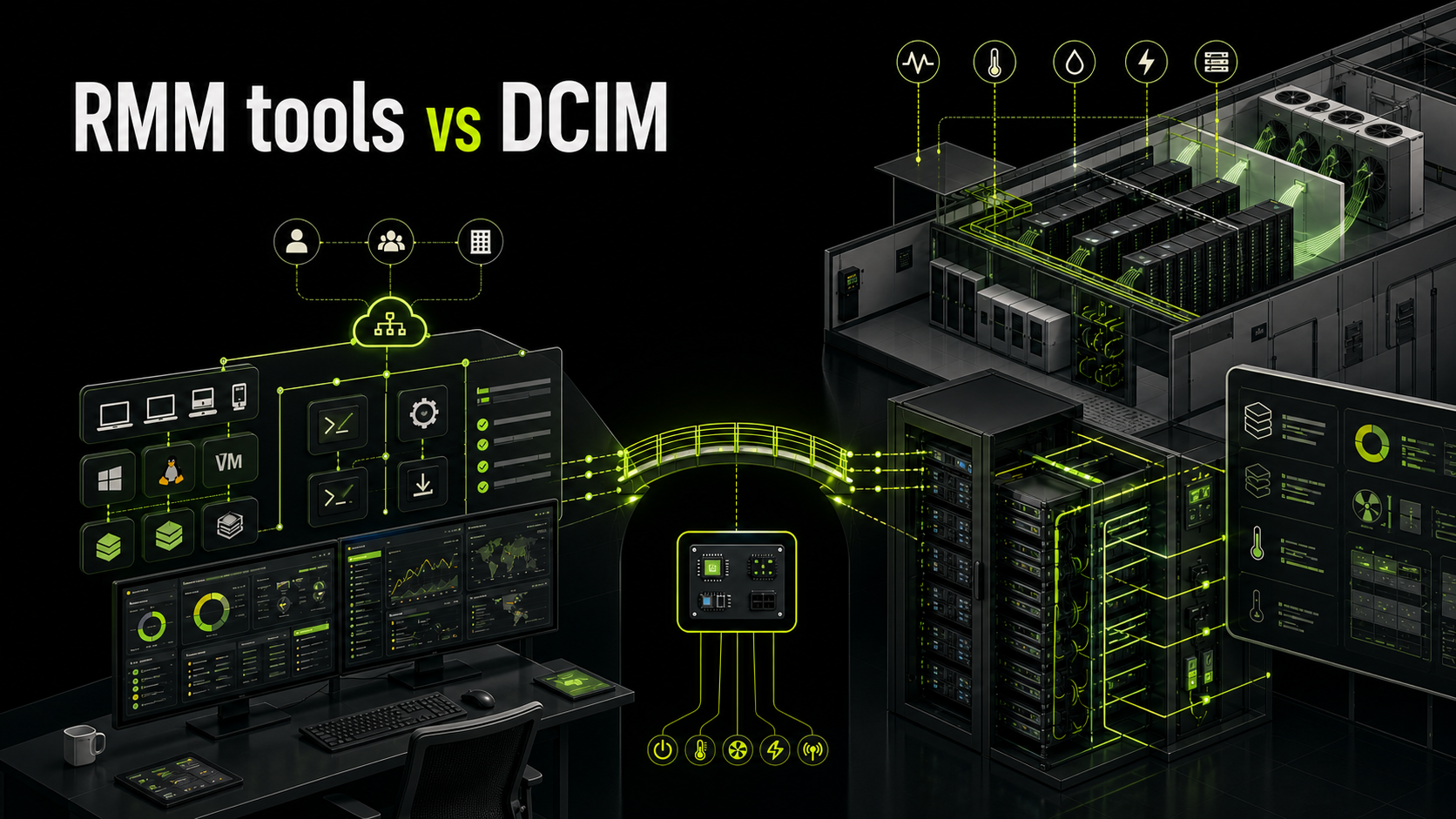
Inside the system
Agents, patches, services, remote access, and OS-level alerts. Strong until the operating system stops answering.
Around the system
Power, cooling, rack capacity, space, assets, and environmental stability across the data center floor.
Across the stack
Hardware control, IT operations workflows, and business service context connected into one operational view.
RMM (Remote Monitoring and Management) manages systems from inside the operating system using agents — patches, services, and OS-level alerts. DCIM (Data Center Infrastructure Management) manages the physical environment — power, cooling, racks, and assets. Neither covers the hardware-to-business-service gap on its own. Out-of-band hardware visibility, paired with operations and service context, closes that gap.
The confusion most teams don't realize they have
If you ask ten IT leaders what tools they use to manage infrastructure, you'll hear a mix of terms: RMM, monitoring, DCIM, ITOM, AIOps. At first glance, they sound interchangeable. They are not.
This confusion leads to a common problem. Teams believe they have monitoring covered because they use an RMM tool, while critical failures still happen at the hardware or data center level. Others invest heavily in DCIM but struggle to connect infrastructure issues to business impact.
To see the gaps clearly, the categories need to be separated by the layer they actually manage.
What is RMM?
Remote Monitoring and Management, or RMM, is designed to manage systems from inside the operating system. It is widely used by managed service providers and IT teams responsible for endpoints, servers, and virtual machines. RMM tools rely on agents installed on devices and focus on software-level visibility and control.
Typical capabilities include patch management, software deployment, OS-level monitoring, remote desktop access, and alerting based on system metrics.
RMM answers questions like:
- Is the server CPU usage too high?
- Did a service stop running?
- Are endpoints patched and compliant?
- Can I remotely access and fix this machine?
This works well as long as the operating system is running and responsive. The limitation is obvious once you look deeper. If the OS crashes, hangs, or loses network connectivity, RMM tools often lose visibility completely.
What is DCIM?
Data Center Infrastructure Management, or DCIM, operates at a completely different layer. Instead of focusing on software, DCIM is built to manage the physical environment of a data center. It tracks and monitors infrastructure such as power systems, cooling, racks, space utilization, and hardware assets.
Modern DCIM platforms also monitor server hardware health, including temperature, power consumption, and component status.
DCIM answers a different set of questions:
- Is my data center overheating?
- Do I have enough power capacity in this rack?
- Which hardware is about to fail?
- How efficiently is my data center operating?
It provides a holistic view of infrastructure stability and efficiency, rather than application performance.
The real gap between RMM and DCIM
At this point, the difference seems clear. One manages software, the other manages physical infrastructure. The problem is what sits in between.
Most failures in modern environments do not stay neatly within one layer. A hardware issue triggers a system crash. A power fluctuation causes application downtime. A failing fan leads to overheating, which then affects workloads.
RMM tools often miss the root cause because they only see the OS layer. DCIM tools detect environmental or hardware issues but do not connect them to applications or business services. This creates a blind spot:
- RMM sees symptoms inside the system
- DCIM sees conditions around the system
- Neither connects everything into a single operational view
That gap is where most operational inefficiencies and outages live.
Why out-of-band visibility changes the game
One critical concept that traditional RMM does not address is out-of-band monitoring. Out-of-band means accessing hardware directly through components like BMC, independent of the operating system. Even if a server is powered off or completely unresponsive, you can still monitor and control it.
This is essential in real-world scenarios:
- When a server crashes and cannot boot
- When network configuration breaks
- When firmware or hardware components fail
- When remote recovery is needed without physical access
Without out-of-band visibility, teams are effectively blind during the most critical failures. DCIM tools sometimes touch this layer, but many focus more on environment and asset tracking rather than deep hardware control across vendors.
Where Sensaka fits
Sensaka is designed to close the gap between RMM and DCIM by covering multiple layers of infrastructure, starting from the hardware level.
Out-of-band hardware monitoring and control
DCOS connects directly to server management interfaces and provides real-time visibility into hardware health, power status, temperature, and component-level issues. This works even when the operating system is down — fundamentally different from RMM, which depends on agents and OS-level access.
IT operations management
iDCOS connects monitoring data with workflows, alerts, CMDB, and service processes. Infrastructure events are not just visible, they are actionable.
Business service mapping and AIOps
SmartBSM connects infrastructure components to the services they support and analyzes relationships across the stack — answering which business service is impacted, what the root cause is, and how an issue propagates upward.
A better way to think about the stack
Instead of comparing tools directly, it is more useful to think in layers.
- At the bottom is hardware visibility and control
- In the middle is infrastructure and operations management
- At the top is business service understanding
- RMM sits mostly in the middle but focuses on the OS layer
- DCIM sits at the bottom but often stops at environment and assets
- Sensaka spans across all three, with a strong foundation at the hardware level
This layered approach reflects how modern infrastructure actually behaves.
Why this matters now
The need for this kind of visibility is increasing, not decreasing. Data centers are becoming more complex. Hybrid environments combine on-prem, cloud, containers, and AI workloads. Hardware density is increasing, especially with GPU systems. Failures are more expensive and harder to diagnose.
At the same time, teams are expected to operate with fewer people and faster response times. Relying on isolated tools creates friction — each tool shows part of the picture, but no single source of truth exists.
Bridging the gap between hardware, operations, and business services is no longer optional. It is becoming the baseline requirement for stable and efficient infrastructure.
Final perspective
RMM and DCIM are not competing categories. They were built for different purposes. The real issue is that neither is sufficient on its own in modern environments.
- RMM gives you control inside the system
- DCIM gives you visibility of the data center
- The connection between hardware, operations, and business impact is still missing
Sensaka sits below RMM, extends beyond DCIM, and connects everything up to the business layer. That positioning reflects how infrastructure needs to be managed today.
Frequently asked questions
See how Sensaka bridges the gap. Request an online trial and explore hardware-to-business-service visibility in one platform.
Request an Online TrialReference: data center.