AI Infrastructure Management for AI Data Centers and AI Factories
AI infrastructure management on one on-premises platform: ask the AI Cockpit a question in plain language and get a custom dashboard and a 30-second data video, built from the same inventory that runs your GPU pools, jobs, facility monitoring and metering.
Sensaka for AI Data Centers connects AI infrastructure, heterogeneous compute resources, GPU clusters, training and inference workloads, networks, storage, liquid cooling systems, and operational processes in one platform. It transforms fragmented computing resources into business capabilities that can be monitored, scheduled, measured, and continuously optimized.
From liquid cooling systems, servers, and accelerator cards in the data center to resource pools, workload scheduling, alarms, service tickets, CMDB, cost metering, and operational analytics, the platform builds a unified operational loop on top of a shared data foundation.
From Infrastructure Delivery to Continuous Operations
Once an AI data center has been built, management priorities shift from infrastructure delivery and hardware quantity to compute utilization, workload success rates, service quality, operating costs, and business output.
Traditional monitoring platforms can usually tell operators whether a device is online. They cannot easily explain whether computing resources are being used effectively, why training jobs are waiting, whether low GPU utilization is caused by compute, network, or storage bottlenecks, or which workloads and business services will be affected by a hardware failure.
Sensaka for AI Data Centers connects five operational dimensions: people, physical infrastructure, activities, compute resources, and business services.
It brings infrastructure status, computing resources, workload relationships, service delivery, staff responsibility, and operational workflows into one unified management environment, helping organizations move from an infrastructure delivery model to continuous AI data center operations.
Ask a Question, Get a Dashboard and a 30-Second Data Video
Fixed dashboards answer the questions someone planned for. The AI Cockpit answers the one asked today. Type a question in plain language, and the platform builds a natural-language dashboard for it from the data it already holds, then renders it as a short video when the board is too dense to talk through.
Ask
Type a question or keywords, such as which GPUs are idle or which tenants are close to quota.
Match
The question is matched locally to preset operational questions, each with its data source, rule, threshold and suggested action.
Board
A custom dashboard is built for that question: top items, breakdowns and comparisons, each drilling down to the records.
Video
One click renders the board as a 30-second data video in the browser, ready for a management meeting.
Runs on-premises. Questions are matched locally, no external language model is called, and operational data stays in your data center.
The video is drawn and encoded in the browser with captions taken from the board's own numbers, so it says exactly what the board shows.
Collection, Data, Services and Cockpit on One Data Set
The platform is built in layers. Collection reads the physical estate in band and out of band. A single data foundation holds CMDB relationships, time series, events and usage records. Services for pools, jobs, metering, alerts, tickets and workflows run on that data, and the cockpits sit on top. Integration interfaces connect each layer to the clouds and tools you already run.
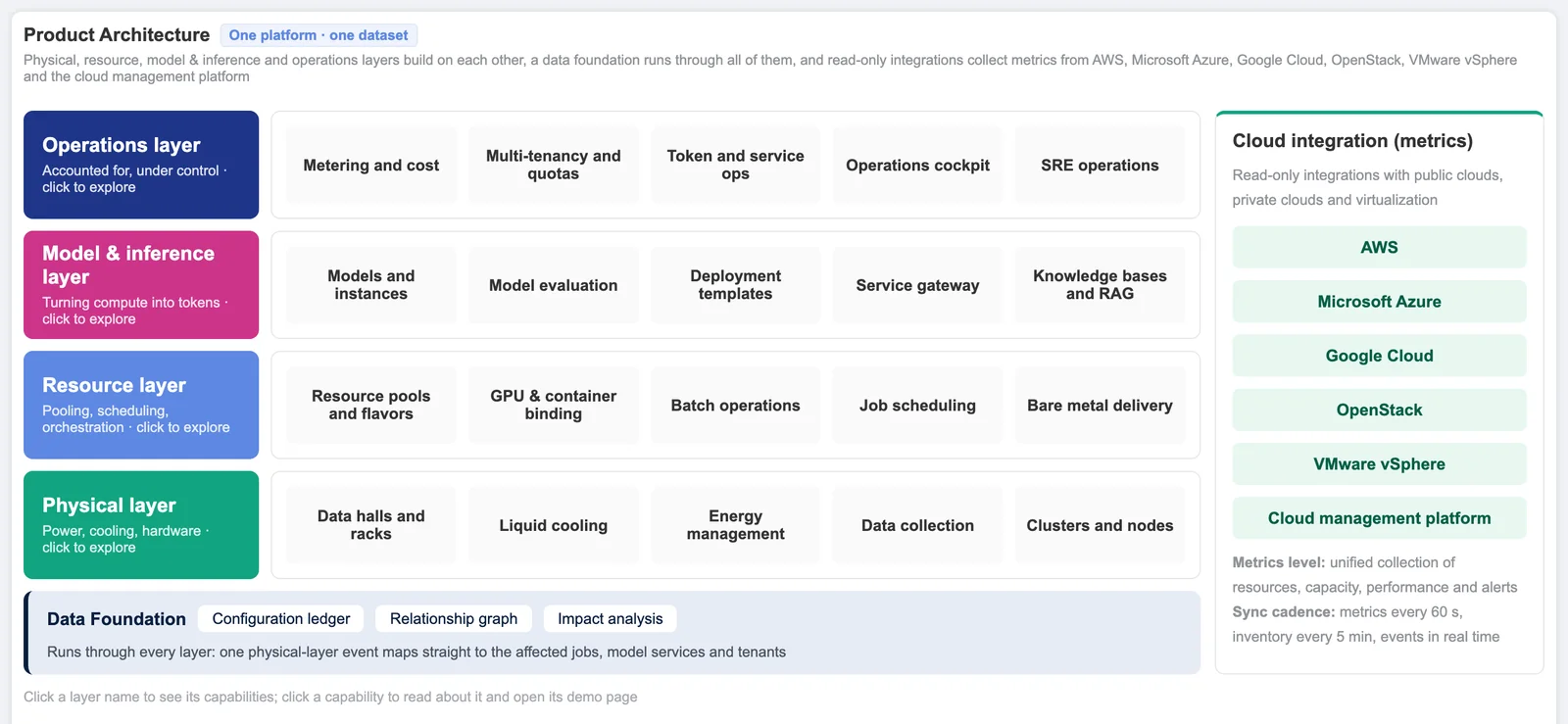
The same platform serves enterprise AI data centers, AI factories that sell GPU capacity or tokens to tenants, and research clusters shared across departments. It deploys on-premises and runs without an internet connection.
One Platform for Unified AI Data Center Management
Unified Monitoring
Centralize the status, performance, capacity, and alarms of servers, accelerator cards, networks, storage systems, racks, power systems, liquid cooling equipment, and environmental infrastructure.
Unified Management
Use an AI infrastructure CMDB to establish real time relationships between data centers, devices, accelerator cards, clusters, workloads, projects, teams, and business services.
Unified Scheduling
Convert distributed physical compute resources into standardized resource pools that can be requested, allocated, released, and governed.
Unified Metering
Measure accelerator hours, resource consumption, energy usage, and operational data by project, tenant, and resource type.
Unified Operations
Connect monitoring, analysis, diagnostics, alarms, service tickets, approvals, and scheduling actions into a complete operational workflow.
Manage Multi Vendor GPU and NPU Resources in One Platform
AI data centers often contain accelerator hardware from different vendors, models, and architectures. Sensaka provides unified heterogeneous compute management across these environments.
The platform identifies accelerator types within each node, brings GPUs and NPUs from different vendors into a common inventory, and establishes relationships between accelerator model, quantity, physical node, operational status, and resource allocation.
Core Capabilities
- Automatic identification of multi vendor GPUs and NPUs
- Component level inventory for accelerator cards
- Unified management across regions and clusters
- Card level utilization, temperature, power, and health monitoring
- Abnormal accelerator detection and isolation recommendations
- NVIDIA, AMD and other accelerators in one inventory
Business Value
Reduce dependency on separate vendor tools and manage heterogeneous compute resources through one consistent interface.
This creates a trusted data foundation for scheduling, capacity planning, infrastructure governance, and operational decision making.
Turn GPU Hardware into Allocatable Computing Resources
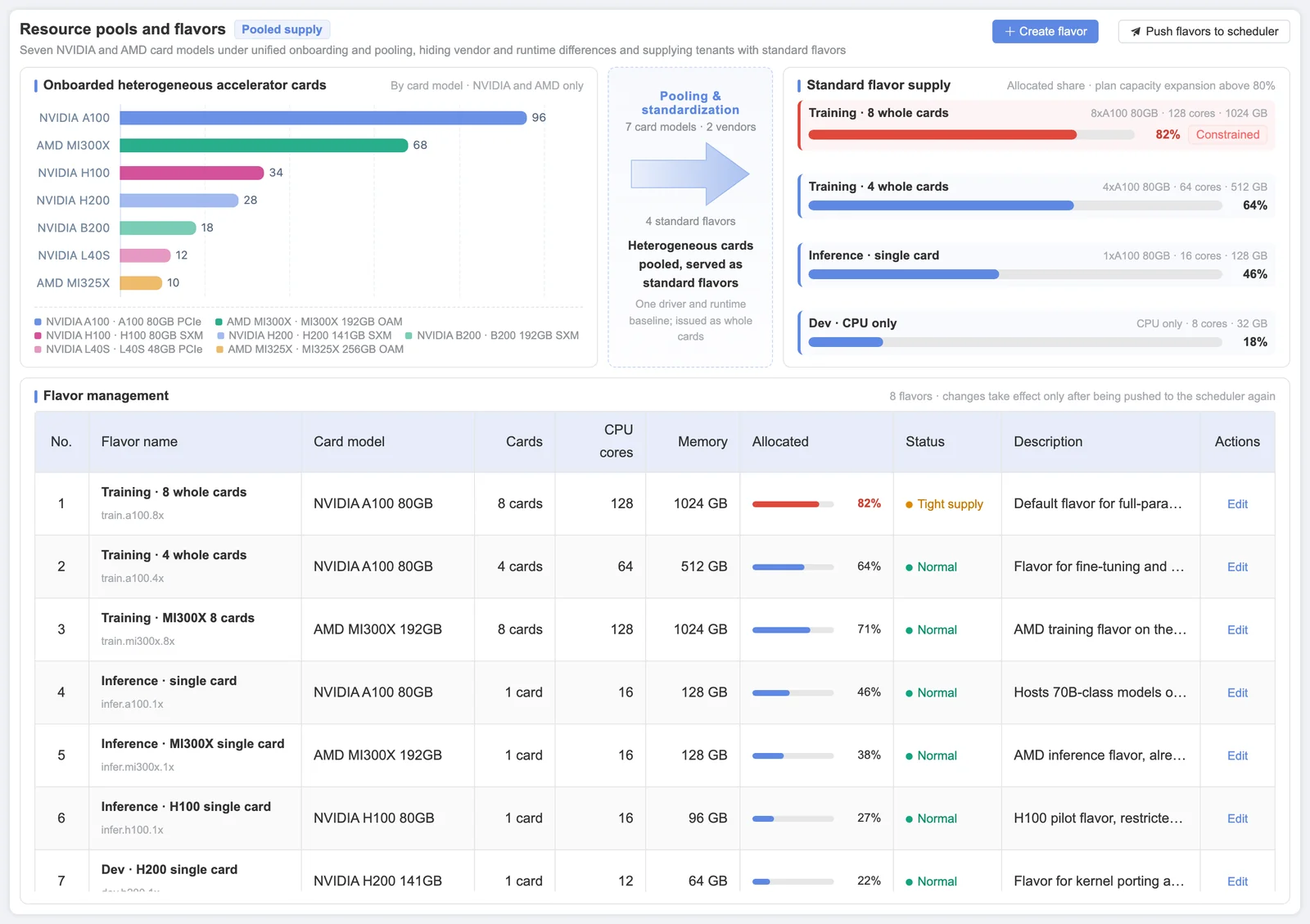
Sensaka abstracts physical accelerator cards into resource pools and manages training, inference, and development workloads through standardized specifications, tenant quotas, workload queues, and scheduling policies.
The platform offers capacity as standard specs, applies tenant quotas in GPU-hours, tokens and storage, queues requests by priority with preemption, and releases resources automatically when a workload completes or times out. These capabilities help AI data centers and AI factories reduce fragmentation, idle resources, and inefficient allocation.
New servers reach the pool through automated bare-metal provisioning: BMC setup, PXE operating system install, drivers and runtime, and a burn-in gate that keeps failing hardware out.
Core Capabilities
- Heterogeneous compute resource pooling
- Resource specifications for training, inference, and development
- Training and inference workload classification
- Workload queue management
- Project and tenant quota controls
- Allocation by standard spec against tenant quotas
- Priority, resource weight, and node filling strategies
- Automatic resource release after completion or timeout
- Faulty node isolation with operator confirmation
- Idle GPU detection against a utilization threshold you set
- Bare-metal provisioning with a burn-in gate before a server joins the pool
Business Value
Improve GPU utilization, reduce over allocation and idle capacity, and prioritize computing resources for the highest value workloads.
Follow Every Training Job and Inference Service From Queue to Release
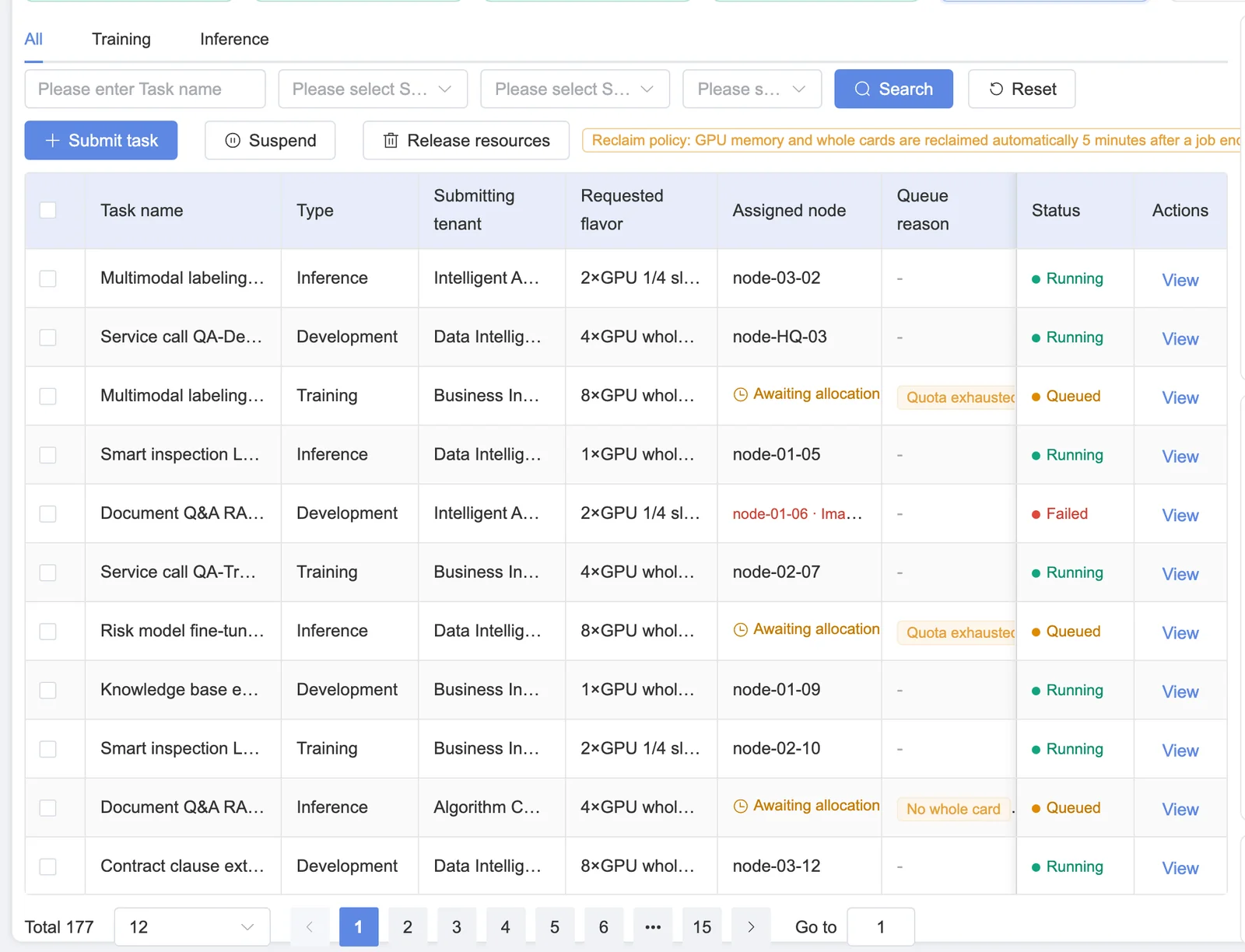
Sensaka reads jobs from Slurm and Kubernetes and shows them in one view. Each queued job carries its queue reason, each running job the GPUs, nodes and containers it holds, and each finished job its GPU-hours and, if it failed, a classified failure reason.
For long training runs, the platform flags degrading GPUs before they fail, shows when and where the last checkpoint was written, forces a checkpoint before preemption and measures the training time an interruption cost.
Core Capabilities
- Queue reasons, priority and preemption per job
- GPUs, nodes and containers held by each job
- GPU utilization, power and health per training job
- GPU-hours per job against the tenant quota
- Job success rate and classified failure reasons
- Degradation signals: memory ECC, NVLink errors, slow GPUs
- Checkpoint timing, location and write duration
- Time to first token, throughput and error rate per model service
Business Value
Shorten the time from a slow or failed job to its cause, and keep one failing card from costing a multi-day training run.
Trace Every Workload to the Accelerator Card
The platform establishes dynamic relationships between workloads, containers, GPUs, nodes, and resource pools. Operators can identify which containers are using a specific GPU and view which accelerator cards have been assigned to a particular container.
Sensaka also monitors requested GPU memory, resource limits, and actual peak consumption, while recording GPU binding and release events for resource analysis, incident investigation, and auditing.
Core Capabilities
- Bidirectional GPU and container lookup
- GPU UUID and container relationship mapping
- GPU binding and release timelines
- Requested, limited, and peak container memory analysis
- Identification of high allocation and low utilization workloads
- Correlation between container failures and resource overcommitment
Analyze GPUs, Training Networks, and Storage on One Timeline
Low GPU utilization does not always indicate insufficient compute demand. Network packet loss, inadequate storage throughput, slow data loading, or hardware problems may force GPUs to wait and leave expensive computing resources idle.
Sensaka brings GPU utilization, network throughput, packet loss, errors and port state, storage throughput, IOPS, read and write latency, and node health together on a shared operational timeline.
Core Capabilities
- Time aligned analysis of GPU, network, and storage metrics
- Training network packet loss, error and port state counters
- Storage throughput, IOPS, and latency analysis
- Data loading and checkpoint write bottleneck identification
- Combined temperature, power, ECC, and hardware health analysis
- A four stage operational loop covering monitoring, analysis, diagnostics, and scheduling
- Recommendation generation, authorized execution, and operational auditing
Business Value
Quickly identify whether a performance problem comes from compute, network, storage, or hardware infrastructure.
Reduce cross team investigation time and lower the risk of long running training jobs being interrupted, restarted, or left consuming resources without productive output.
Unified Liquid Cooling and Facility Monitoring for High Density AI Infrastructure
As GPU server power consumption and rack density continue to increase, liquid cooling becomes a critical part of reliable AI data center operations.
Sensaka monitors liquid cooling system status, inlet and outlet temperature, pressure differences, and related environmental indicators. These metrics are correlated with rack power density, temperature, humidity, leak detection, and power distribution data to help operators identify cooling failures and thermal risks.
Core Capabilities
- CDU and liquid cooling system status monitoring
- Inlet and outlet temperature monitoring
- Pressure difference monitoring
- Temperature and humidity monitoring
- Liquid leak event monitoring
- Rack level power density analysis
- Identification of constrained racks and thermal hotspots
- Power distribution and PDU circuit monitoring
- Combined analysis of rack space, power, and cooling capacity
Business Value
Bring liquid cooling monitoring into the broader AI infrastructure operations environment.
Identify temperature, pressure, leakage, and capacity risks before they affect high density GPU clusters.
Power, Cooling and Energy Under the AI Stack
Model-serving and scheduling platforms cannot see the facility. Sensaka can: rack power density, PDU circuits, cooling and liquid-cooling readings, temperature and humidity sit in the same platform as the GPUs and jobs that depend on them.
Energy data is turned into PUE and WUE, energy cost per project and per token, and the reporting an EU data center needs under the Energy Efficiency Directive.
Core Capabilities
- Rack power density heat map with limit alerts
- PUE and WUE for the site and per zone, live and as a trend
- Energy cost allocated to projects, tenants and tokens
- Liquid-cooled and air-cooled zones compared on efficiency
- Energy and emissions tracking for EU EED reporting
- Capacity trends to support expansion decisions
Turn the Asset Inventory into a Real Time Relationship Data Foundation
The Sensaka CMDB is more than a static list of devices. It continuously records relationships between people, physical infrastructure, operational activities, computing resources, and business services.
This common data foundation supports monitoring, scheduling, metering, alarm management, service tickets, and business impact analysis.
Core Capabilities
- Automatic device and component discovery
- Data center, rack, and rack unit relationship management
- Unified inventory for servers, GPUs, networks, storage, and liquid cooling systems
- Workload, container, node, and accelerator relationship tracking
- Tenant, project, team, and owner associations
- Configuration change tracking and historical snapshots
- Automatic impact analysis through relationship mapping
- One shared configuration source for monitoring, scheduling, metering, and service management
Connect Clouds, ITSM, CMDB and Alerting Without Replacing Them
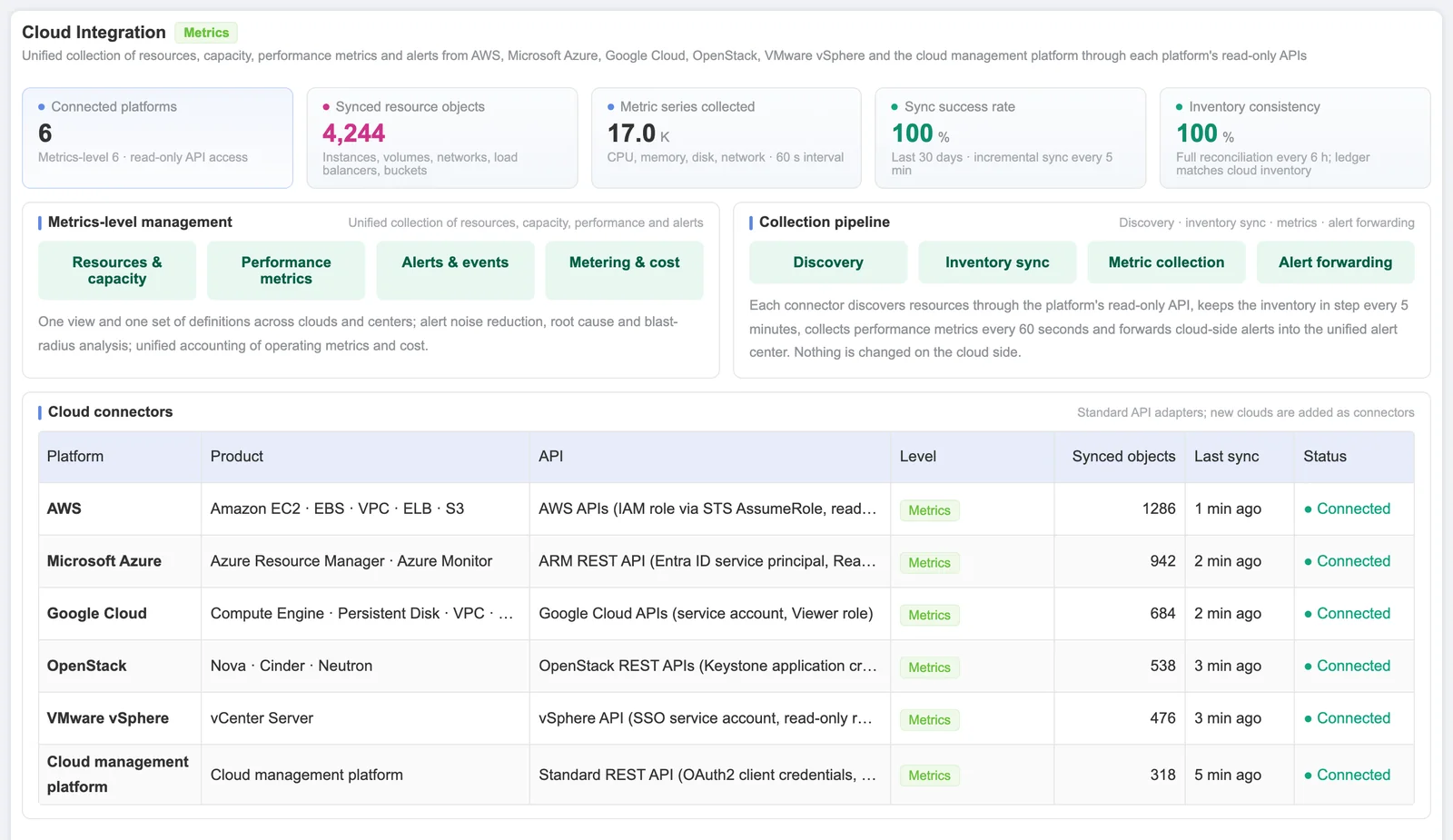
Sensaka collects resources, capacity, performance and alarms from AWS, Microsoft Azure, Google Cloud, OpenStack and VMware at the metrics level, so on-premises GPU clusters and cloud capacity are counted with the same definitions. Changes to cloud resources stay in each cloud's own tools.
Northbound, the platform syncs CMDB records and tickets with ServiceNow or Jira, routes correlated alerts to PagerDuty, OpsGenie, Slack, email or a webhook, and offers a REST API and webhooks for your own systems.
Core Capabilities
- Metrics-level collection from AWS, Azure, GCP, OpenStack and VMware
- CMDB and ticket sync with ServiceNow or Jira
- CMDB enrichment with hardware facts read from the BMC
- Alert routing to PagerDuty, OpsGenie, Slack, email or webhook
- REST API and webhooks
- In-band and out-of-band collection across 14 protocols
Built on Sensaka's DCIM, ITSM and AIOps Layers
The AI platform is not a new code base on its own. It runs on the same modules as Sensaka for Data Centers, the product for conventional data centers. The underlying platform has 9+ years in production and 3M+ devices monitored across its deployment base.
From Infrastructure Monitoring to Closed Loop Operations
Sensaka for AI Data Centers connects resource discovery, device onboarding, resource pooling, workload requests, intelligent scheduling, metering, analytics, and operational optimization. Operational insights can be used to adjust resource specifications, scheduling policies, quotas, and management scope, creating a continuous optimization loop.
Resource Readiness
Automatically discover devices, manage heterogeneous compute resources, and establish standardized resource pools and specifications.
Workload Delivery
Allocate computing resources to training, inference, and development workloads through queues, project quotas, and scheduling policies.
Operational Optimization
Continuously optimize resource allocation and operational policies using utilization, workload status, compute, network and storage performance, hardware health, and cost data.
Built for Every AI Infrastructure Environment
Enterprise AI Data Centers
Manage GPU servers, networks, storage, liquid cooling infrastructure, and workload scheduling in one platform to improve internal resource utilization.
Public Computing Centers
Establish multi tenant resource pools, project quotas, workload queues, and usage reporting to improve resource delivery and commercial operations.
Financial Services and High Availability Industries
Use in band and out of band collection, component level monitoring, failure impact analysis, and auditable operational processes to protect critical training and inference services.
Telecommunications and Multi Site Environments
Centrally manage regional data centers, distributed clusters, infrastructure resources, and operational data across multiple locations.
Universities and Research Organizations
Manage GPU requests, quotas, allocation, usage, and resource release across research teams, departments, and projects.
What Changes When Every Accelerator Is Managed
Gain Complete Compute Visibility
See GPUs, NPUs, servers, networks, storage, liquid cooling equipment, and rack resources through one platform.
Improve Resource Utilization
Reduce compute waste through resource pooling, specification management, workload scheduling, and idle resource identification.
Accelerate Problem Resolution
Use GPU and container correlation together with compute, network and storage analysis to identify bottlenecks and business impact more quickly.
Protect Training and Inference Stability
Detect hardware, network, storage, temperature, and liquid cooling risks before they interrupt workloads.
Build a Trusted Operations Data Foundation
Connect resources, workloads, projects, staff, costs, and business services to support operational and management decisions.
Explore Sensaka AI Infrastructure Solutions
Frequently Asked Questions
What is AI infrastructure management?
AI infrastructure management is the work of keeping an AI data center or AI factory productive: knowing where every accelerator is and what state it is in, allocating GPU capacity fairly, following jobs, watching power and cooling, and accounting for GPU-hours and tokens. Sensaka does this on one platform with one inventory.
Does the AI Cockpit use an external AI model?
No. The AI Cockpit matches questions locally against preset operational questions and builds the board and video from data already in the platform. It runs on-premises, and your data does not leave the data center.
Which accelerators does the platform support?
NVIDIA, AMD and other accelerators. Supported models and fields depend on each vendor's management interfaces and are confirmed for your hardware in the scoping call before a pilot.
Is Sensaka GPU monitoring software or a scheduler?
It is GPU monitoring software and an operations platform that works with your schedulers. Sensaka reads jobs from Slurm and Kubernetes, manages pools, specs and quotas, and monitors the hardware and facility underneath; it does not replace the scheduler you run.
How do we start?
With a free 30-day on-premises pilot on part of your estate, with success criteria agreed before it starts. Public list prices for the platform's DCIM and monitoring layers are on the pricing page; partners who resell or integrate Sensaka earn a 25% margin in the first year.
Make Every Accelerator Visible, Manageable, Schedulable, and Measurable
Sensaka for AI Data Centers helps organizations manage AI infrastructure and heterogeneous compute resources through one unified environment. It creates a complete operational loop from device monitoring and GPU resource scheduling to compute, network and storage coordination, liquid cooling monitoring, CMDB, metering, and operational optimization.
The pilot runs on-premises for 30 days, free of charge, with success criteria agreed before it starts.
Integrators and resellers: the Sensaka partner programme offers a 25% margin in the first year. Talk to us.